Tag: Vendor Tips

  • The “Second Shooter” You Don’t Have to Pay

    The “Second Shooter” You Don’t Have to Pay

    The modern wedding or large-scale event is a whirlwind of fleeting moments, intimate connections, and sprawling activity across multiple locations. From the silent, nervous anticipation of the bridal party to the raucous, uninhibited joy on the dance floor, every client wants proof that their entire world was captured, preserved, and documented. This is not just a passing preference; the data confirms it. Over half…a staggering 52% of all couples…express a clear desire for comprehensive, wall-to-wall photographic documentation that captures every single aspect of their day, from the grand entrance to the tiny, unscripted moments others might miss.

    For professional photographers, this mandate creates an immediate, costly, and often logistical challenge. The traditional solution is simple, yet expensive: hire a dedicated second shooter.

    A human second shooter is invaluable for capturing multiple angles during the ceremony, covering the groom’s prep while the main shooter is with the bride, or ensuring detail shots are taken while the couple’s portrait session is underway. However, a human second shooter means a second payroll, a second vendor meal, and a second set of complex scheduling and management considerations. For many clients, the added expense simply pushes their photography budget past its breaking point, forcing them to compromise on their dream of full-day coverage.

    But what if you could have all the benefits of that second shooter…the extended coverage, the different perspective, the dedicated documentation of an entire segment of your event…without any of the associated costs or logistical headaches?

    Enter ZillaBooth: The Automated Professional Second Shooter.

    ZillaBooth is not a traditional, clumsy photo booth with fuzzy digital output and novelty props. It is a strategically deployed, automated photographic station designed by professionals to function as a seamless, high-resolution complement to the lead photographer. We’ve redefined the role of the “photo booth” and elevated it into a dedicated, stationary camera operator whose sole purpose is to fill the critical coverage gap that a single roving photographer, no matter how talented, simply cannot manage on their own.

    Its function is precisely framed by the needs of a comprehensive documentation plan: the main photographer is liberated to roam. They are free to chase the perfect light, follow the couple through various locations, direct the formal family portraits, and ensure every scheduled, key moment is captured with the artistry and technical precision that justifies your high-end service.

    Meanwhile, ZillaBooth takes on the crucial task of dedicated guest documentation. It remains permanently in one spot, acting as an unwavering, high-quality camera capturing the energy, the fun, and the candid authenticity of your attendees. This separation of duties is the strategic advantage that satisfies the client’s demand for 100% coverage without the 100% markup of a human assistant.

    The Power of Stationary Coverage: Why A Booth Works Better Than a Roving Eye

    The single biggest failure point in event photography is often the coverage of the reception, cocktail hour, and late-night guest interactions. The main photographer is pulled in a dozen directions: detail shots of the cake, the official first dance, candid moments between the couple and their parents, and vendor hand-offs. It is impossible for one person to also simultaneously capture the atmosphere of the cocktail lounge or the spontaneous group photo attempts by the bar.

    Analog film photograph of section 1 related to The

    ZillaBooth is placed in a high-traffic, low-formality area…the perfect environment for its role. It provides a consistent, professional lighting setup and high-resolution camera gear that is always on, always ready, and always focused on one thing: capturing the guests in their element.1.

    Consistency and Quality: Unlike a photographer who must constantly adjust their lighting and exposure as they move through a space, ZillaBooth is a fixed-light scenario. Set it up once with good lighting, and every single image…from the first snap of the evening to the final shot…is perfectly lit, consistently exposed, and razor-sharp. This consistency makes the resulting archive feel cohesive and professional, not like a collection of disparate phone snaps.

    1. The Candid Factor: The human element, while essential for directed moments, can be a barrier for true candids. Guests often feel a degree of self-consciousness when a photographer raises a long lens to their face. The genius of the automated ZillaBooth is that it is a machine. Guests interact with it differently. The moments captured in a booth…the silly faces, the uninhibited laughter, the in-jokes acted out with props…are often the most raw, honest, and truly personal photographs of the entire day. These are the spontaneous “paparazzi aesthetic” moments of genuine fun, the ones that capture the true spirit of the celebration, which perfectly complements the main photographer’s polished, editorial work. ZillaBooth harvests an archive of pure, unforced guest joy.

    2. Complete Archival Coverage: The numbers don’t lie. A single photographer, even with a second, is limited by their attention and movement. ZillaBooth is an unblinking eye that works for hours without a break, generating a massive volume of guest data. This is what clients are truly paying for when they demand “every aspect of the day photographed”…they want every person captured, not just the principals. ZillaBooth guarantees a photographic record of every attendee who steps in front of the lens.Technical Integration into the Professional Workflow

    Analog film photograph of section 2 related to The

    For professional photographers, ZillaBooth isn’t competition; it’s a force multiplier. It integrates seamlessly into the post-production workflow, acting as an outsourced department of the photography team. File Handling: With Pocket’s auto-save (included with Pro), ZillaBooth saves every photo on the iPad, so you can hand the full set to the lead photographer after the event. This allows the primary photography team to color-correct, edit, and deliver the booth photos alongside the rest of the professional archive, maintaining brand consistency across all images.

    • Customization: It becomes another tool for branding and personalization. Clients can select custom backdrops that match the event’s aesthetic…a professional floral wall, a clean geometric pattern, or a custom step-and-repeat banner. The output feels intentional and curated, not like an afterthought.
    • Instant Gratification & Marketing: ZillaBooth lets guests share right away. While the full set goes to the photographer after the event, guests can email their collage to themselves on the spot. This creates massive on-the-day engagement, ensures immediate positive feedback for the client, and generates organic social media buzz for the entire event…all without distracting the lead photographer.Strategic Deployment: Maximizing the Value of Your Automated Shooter
    Analog film photograph of section 3 related to The

    Where you place ZillaBooth determines the quality and type of secondary coverage you achieve. Treat it as a strategic camera position, not just a decoration.1. The Cocktail Hour Anchor: Position the ZillaBooth near the bar or entrance during the cocktail hour. This is a crucial time when the main photographer is often occupied with family portraits or couple’s portraits. The Booth captures every arriving guest, ensuring the initial energy and fashion of the event are documented.

    1. The Reception Entertainment Zone: Place it near the periphery of the main reception hall or, ideally, near the dance floor entrance. As the party progresses and inhibitions lower, the Booth becomes an entertainment magnet, yielding those truly candid, high-energy, late-night shots that a photographer might miss while focusing on the main events.
    2. Bridal/Groom Prep Alternative: For extended coverage packages, consider setting up a simplified ZillaBooth station during the morning prep in one of the primary getting-ready locations. It provides a fun, lighthearted alternative for the bridal party to use while the main photographer is focused on the gown, the details, or the first look, generating an extra set of casual images without the need for a third photographer.In an industry where comprehensive coverage is quickly becoming the expectation, not the luxury, relying solely on human resources is an unsustainable business model for both the client and the photographer. ZillaBooth provides the elegant, technological answer. It is a cost-effective, high-quality, and reliable automated camera station that stands guard, documenting the vital and dynamic guest experience while the lead photographer is free to capture the story of the principals.

    It is the stationary, dedicated, and professional second shooter that never needs a break, never asks for overtime, and perfectly complements the artistry of the human team. By framing ZillaBooth not as a fun accessory, but as a critical piece of the photographic infrastructure, you give clients the full, 52%-approved, wall-to-wall coverage they desire, allowing the main photographer to deliver their best work, and ultimately, ensuring that every single aspect of the celebration is beautifully and professionally captured. It’s not just a product; it’s a strategic partnership in full-service event documentation. For setup details, see our wedding photo booth guide.
  • Wedding Vendors: Add a Photo Booth to Your Package With Your iPad

    Wedding Vendors: Add a Photo Booth to Your Package With Your iPad

    Grow Your Wedding Package: Why Your Existing iPad Is the Key to an Easy Photo Booth Add-On

    If you’re a professional wedding DJ or planner, you’re already a master of logistics, atmosphere, and client satisfaction. You know the market, you have the clients, and you have the expertise. But in an industry where every client is looking for maximum value, there is a good chance you are overlooking one of the easiest ways to add value to your service package this year: adding a photo booth.

    Wait, don’t scroll past. We’re not talking about buying a dedicated booth rig, dealing with bulky crates, or hiring a new dedicated staff member. We are talking about leveraging the professional-grade technology you already carry in your gear bag…your iPad…and unlocking its potential with one simple app: ZillaBooth.

    This is the ultimate business hack for wedding vendors. The core promise is simple: turn a device you already own (your iPad) into a fun, four-hour photo booth add-on that clients love, starting today. You don’t need a big new rig, you don’t need additional staff, and you don’t need storage space for new gear. You already have the venue access, the client trust, and the contract, which makes the booth easy to fold into what you already do.

    The Vendor’s Dilemma: Giving Clients More vs. Minimizing Stress

    Every wedding professional knows the dance: clients want more, but they are often budgeting aggressively. You, the vendor, want to offer comprehensive, competitive packages without overloading your team or sinking cash into new inventory. A dedicated photo booth company is an extra contract, another deposit, another vendor to coordinate, and another logistical headache for both the client and the planner. By positioning the photo booth as a simple, no-fuss “add-on” managed directly by the primary vendor (you), you solve the client’s problem while making your own package more complete.

    Analog film photograph of section 1 related to Wedding Vendors: Add a Photo Booth to Your Package With Your iPad

    This is fundamentally an issue of convenience. Clients prefer buying services from people they already trust. When you, the DJ who controls the entertainment flow, or the Planner who orchestrates the entire event, simply check a box and say, “Yes, we can handle the photo booth, too,” you eliminate client friction and create an immediate, effortless upsell opportunity. The client gets a professional, modern photo booth experience, and the extra setup and labor for you stay small.

    Section 1: The Lightweight Advantage…Why Traditional Photo Booths Feel Dated

    The biggest barrier to entry for most vendors considering a photo booth has always been the equipment. Traditional booths are bulky and complicated. They require a dedicated rig, a full DSLR camera setup, studio flashes, complex proprietary software, a printer, and a dedicated staff member to manage it all.

    Analog film photograph of section 2 related to Wedding Vendors: Add a Photo Booth to Your Package With Your iPad

    The ZillaBooth + iPad model eliminates all of this.

    Your Existing iPad is the Camera and Computer: The latest generations of iPads, even models a few years old, possess cameras superior to many older dedicated photo booth systems. They are already high-resolution, reliable, and portable. They are the heart of your new add-on.

    The Software Is Simple: ZillaBooth is free to download, and Pro is a monthly or yearly subscription that adds the event tools vendors reach for, like your own overlays, email delivery from your own domain, and Simple Printing via AirPrint. Compared with buying and hauling a dedicated booth rig, it is a much lighter way to add a photo booth to your lineup.

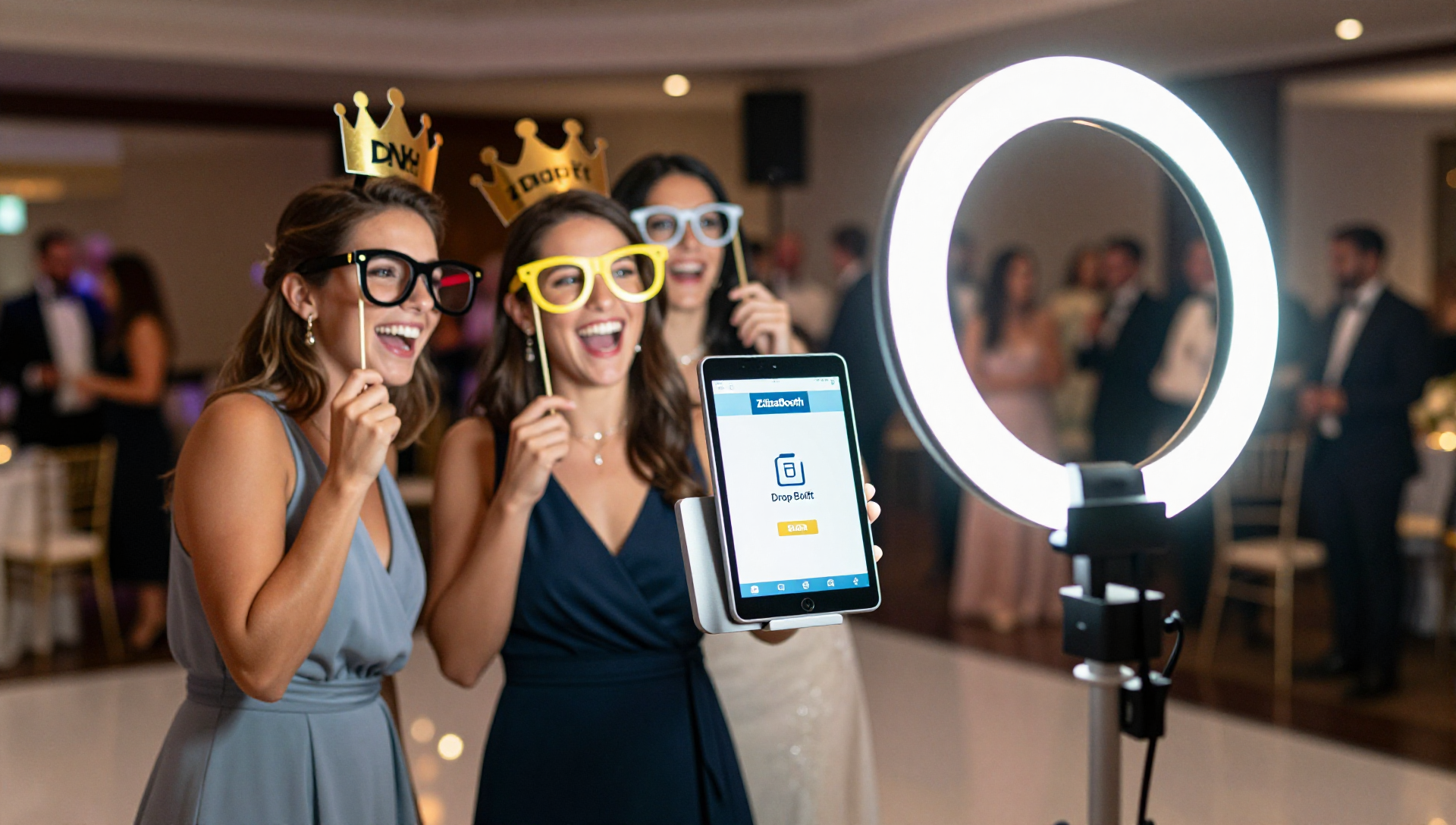
    No Bulky Gear, No Logistics Nightmare: The entire photo booth setup boils down to three things: your iPad, a simple light stand/tripod, and a basic ring light (a simple purchase you’ll use for years). It’s a slim, elegant setup that fits in a small carry bag and takes five minutes to set up, integrating seamlessly into any venue space. The days of lugging massive, heavy crates are over.

    Section 2: The DJ’s Natural Add-On…Integrate and Simplify

    For the mobile DJ, this is the most natural add-on service imaginable. You are already booked, you are already setting up in a high-traffic area, and you are already the life of the party.

    Analog film photograph of section 3 related to Wedding Vendors: Add a Photo Booth to Your Package With Your iPad

    Optimal Placement and Power: Your DJ booth is the hub of the party. You have dedicated power and a reserved footprint. Tucking a sleek, iPad-based photo booth on a stand near the dance floor is a perfect, low-impact way to utilize your existing real estate.

    Guest-Led Operation: The secret to the DJ’s success with this model is the ‘Drop-Off Booth’ concept, enabled perfectly by ZillaBooth. Once you’ve set up the tripod, ring light, and iPad running ZillaBooth, the booth is guest-led. With Pro and Apple’s Guided Access, it resets between guests, keeps Settings hidden, and queues prints and emails if the Wi-Fi drops. With Guided Access or Single App Mode on, the screen stays on all event. Set Auto-Lock to Never (Settings → Display & Brightness) and keep the iPad plugged in. Guests tap the screen to start, the app guides them through the process, and with Pro email delivery they get their collage in their inbox a moment later. Your DJ or assistant should still glance over now and then, but it doesn’t need someone standing next to it, meaning you can offer four hours of photo booth fun without adding another staff member to the night.

    Enhancing the Guest Experience: By offering the booth, you’re providing an additional form of entertainment that runs concurrently with your music sets. It keeps guests engaged during dinner or slow points, and the instant-sharing feature acts as an organic, digital memento of the night. Guests walk away remembering the fun your company provided.

    Packaging It for Your Clients: Offer the photo booth as a simple add-on to your existing packages, at a rate that fits your market. Because it runs on gear you already bring, it slots into the night without extra trucks, crates, or staff, and couples get one more fun thing from a vendor they already trust.

    Section 3: The Wedding Planner’s Competitive Edge…The Seamless Solution

    For the wedding planner, adding the ZillaBooth service is less about direct staffing and more about control and client experience. Our wedding photo booth guide shows what guests see and how setup works.

    Analog film photograph of section 4 related to Wedding Vendors: Add a Photo Booth to Your Package With Your iPad

    Becoming the One-Stop-Shop Hero: Clients are always looking to minimize vendors. When a planner can confidently say, “I have a trusted, modern photo booth solution that I manage personally,” it eliminates a line item from the client’s to-do list. This is a massive relief for a stressed couple and immediately elevates the planner’s perceived value as a full-service provider.

    Eliminating Vendor Coordination: No more chasing down contracts, coordinating load-in/load-out times, or dealing with the insurance paperwork of an external photo booth company. You control the equipment and the timeline. This streamlines your entire event management process and reduces your day-of stress.

    Two Ways to Offer It: Planners have two simple options:

    1. Planner-Run Model: The planner sets up a ZillaBooth Pro subscription and the simple hardware (tripod/ring light), brands the service as their own, and includes it in the package. They can run it with an assistant or partner with a trusted DJ to handle the quick setup and tear-down.
    2. Partner Model: The planner partners with a trusted, ZillaBooth-equipped DJ and offers the booth as part of the package, coordinating it without any hands-on setup. In both cases, the planner adds a modern photo booth to the package while improving the client experience and simplifying the vendor list…a true win-win.

    Section 4: The 5-Minute Technical Setup Guide

    Doubtful that a professional-grade experience can come from an iPad? That’s where the ZillaBooth application proves its worth. It’s not a hobby app; it’s a professional photo booth software suite.

    Analog film photograph of section 5 related to Wedding Vendors: Add a Photo Booth to Your Package With Your iPad

    Step 1: The Hardware Foundation The only two items you need beyond your existing iPad are an adjustable light stand or tripod and an LED ring light. * The Stand: Look for an inexpensive but sturdy stand with an adjustable mount for your iPad. * The Ring Light: This is critical. While the iPad flash works, a good ring light gives flattering, even lighting on all guests, mimicking the look of professional studio light.Step 2: ZillaBooth Customization The ZillaBooth app is where the magic happens. Before the event, you will upload the client’s custom PNG overlay (e.g., “The Smiths – 10.15.2026”). * Branding & Overlays: Design a transparent PNG overlay that matches the wedding’s look. With Pro, ZillaBooth puts it on every collage, in every email and every print. * Sharing: Turn on Pro email delivery so guests type their address and get the collage in their inbox, or leave the standard iOS share sheet in place. This is the feature that guests love and what drives social media buzz. * Four-Shot Collages: Every session is four photos laid out as a 2×2 grid or a 1×4 strip, ready to email or print.Step 3: The Backdrop and Props While a traditional booth might require heavy curtains, the elegant iPad stand looks great against a simple, well-lit wall. * Simple Backdrops: A sequined cloth backdrop on a lightweight stand or simply the venue’s existing brick wall or draped fabric. The iPad setup is so compact it blends into its surroundings. * Props: This is the fun part. Invest in a small, clean set of high-quality physical props (hats, signs, oversized glasses) and simply lay them on a small table next to the stand.Step 4: The Event Workflow When you arrive at the venue, set up the stand, mount the iPad, plug in the ring light, and launch the ZillaBooth app with the client’s overlay loaded. Do a quick test session (and a test print if you are printing). Explain the two-step process (tap to start, follow the prompts) to the venue coordinator or an available assistant. That’s it. Keep Awake (Pro): with Guided Access, the booth screen stays on all event, so guests can run the booth themselves for the whole rental, as long as Auto-Lock is set to Never and the iPad stays plugged in. Check on it between sets.

    What the Add-On Brings to Every Booking

    Forget the spreadsheets for a minute. Here is what the booth adds to the work you already do:

    • A memorable extra for the couple: Guests leave with a four-photo collage in their inbox (and a print, if you set up Simple Printing), finished with the couple’s custom overlay.
    • One fewer vendor for the client: The booth is part of a package they already booked, so there is no extra contract, deposit, or load-in to chase.
    • Gear you already carry: Your iPad, a stand, and a ring light fit in a small bag and set up in minutes.
    • A repeatable workflow: Load the overlay, run a test session, turn on Guided Access, and check on the booth between sets.

    It is a small, easy addition that makes your package feel more complete and gives guests something to talk about long after the last dance.

    Final Action: Add the Photo Booth to Your Packages Today

    The era of big, expensive photo booth rigs is ending, replaced by sleek, modern, digital-first solutions that rely on the power of modern mobile devices. For wedding DJs and planners, this is not just a trend…it’s an urgent business imperative. You are already at the venue, you have the trust of the client, and you possess the core technology. The only thing you are missing is the final step: downloading the ZillaBooth app and adding the photo booth to your packages.

    Stop sending clients to outside vendors for a service you can handle yourself, simply and cleanly. Become the one-stop solution, give couples one less thing to worry about, and give their guests a booth they will remember. Download ZillaBooth, start Pro, add the photo booth to your contract, and enjoy a more complete package this wedding season.